Skip to content
Our vision

A factory that thinks and works with you.

With factorIQ, AI agents connect orders, knowledge, and processes across your existing systems and independently move work forward.

  • You set the goals and boundaries.
  • Your agents take care of the work.

From iosys projects

  • maxon
  • DUAP
  • SMPtec
  • GEWO Feinmechanik
  • Unifil AG
  • Eglin AG
ontology

Factory data is messy. The ontology gives it shared meaning.

Purchase orders, drawings and ERP tables describe the same orders, parts and operations, each in its own way. Agents propose mappings; your accountable experts confirm them.

From raw data to shared meaning

Orders, parts, operations: one model
  1. PDF purchase order in the mailbox

    Details sit as text in a PDF, not as fields in the ERP.

    becomesCustomerOrderPart

  2. Work instruction as PDF or DOC

    Unstructured; every extracted field carries a confidence rating.

    becomesOperationPart

  3. Scanned drawing

    No text layer, 8 of 11 sheets rotated, 7 title-block layouts.

    becomesPart

  4. ERP database

    Proprietary and undocumented: about 5,000 objects narrowed to six core tables.

    becomesOrderDepartment

  5. Handwritten check marks and notes

    A supplier's inspection remarks, not drawing content.

    becomesSupplierPart

  6. Promised delivery date

    When a supplier moves a date, planning recalculates by hand today.

    becomesSupplierPartOrder

  • Customer
  • Order
  • Part
  • Operation
  • Department
  • Supplier
  1. Customer places Order
  2. Order contains Part
  3. Part is made in Operation
  4. Operation runs in Department
  5. Supplier supplies bought-in parts Part

Today this model is built per workflow and it grows with every one. Company-wide data cleanup is not required for the first workflow.

explore the factory

The whole factory at a glance: what runs, what grows.

Choose a module. Each one names its status and, where available, its evidence.

The connected factory, module by module

Color shows each module's current status.

Order office

Planning and control

Production hall

  1. Quality checks · Customer complaints
  2. Root-cause analysis
  3. Your team approves the change
  4. Revised: Work instructions · Knowledge

Ontology: orders, parts, operations, suppliers

  • Available and in use
  • In development
  • Planned
  • Dashed: the path of an order
  • Orange: revised modules · Numbers: learning-loop steps

Shop-floor quality checks and customer complaints from Service feed root-cause analysis independently. Your team approves changes to knowledge and work instructions. The next order tests their effect.

Order entry

available as SaaS

The model reads PDF purchase orders from the mailbox; deterministic checks validate the result, and a person approves. The approved result enters the ERP in structured form.

Evidence: 20 → 2 hours per week at a CNC contract manufacturer

to the product →

Work instructions

running at customers

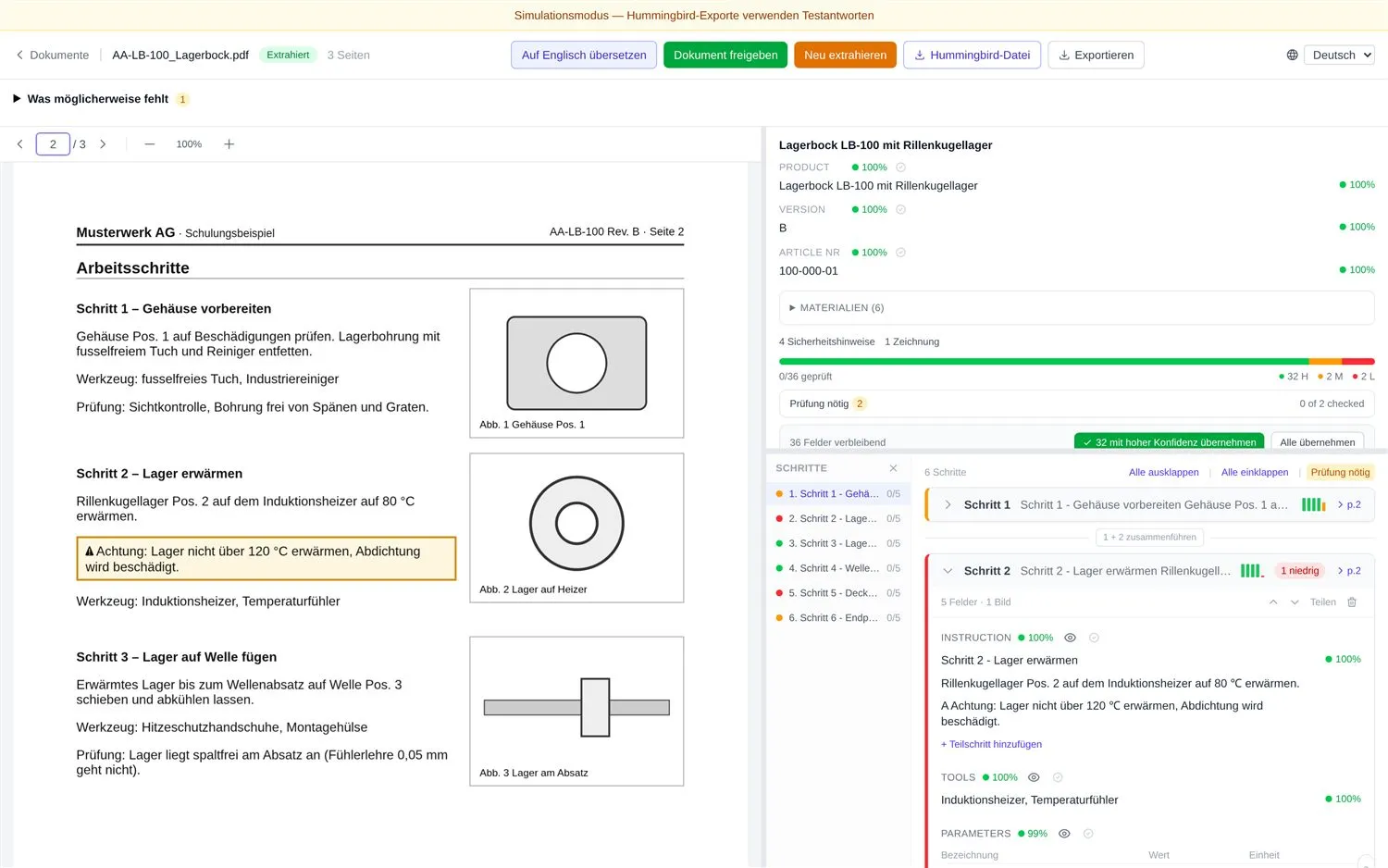
Unstructured instructions from PDF and DOC are extracted and entered into the MES, with a confidence rating per field and a check by the operator.

Evidence: in production, export to the Hummingbird MES

Shop floor

running at customers

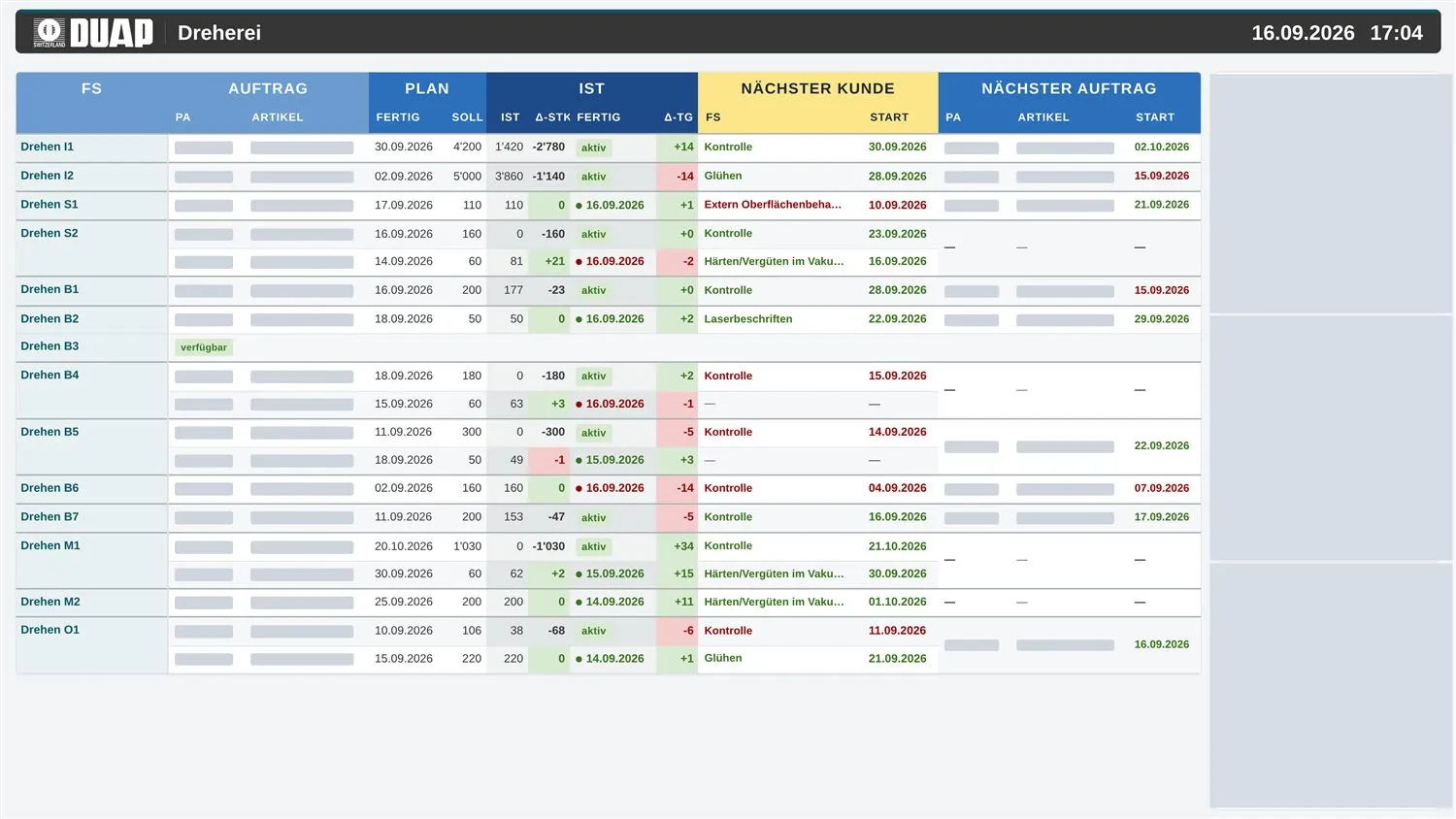
KPIs from ERP and MES where the work happens: one screen per department, orders, due dates, and deviations as soon as they occur.

Evidence: ten screens in around 30 hours of engineering effort

Planning

in development

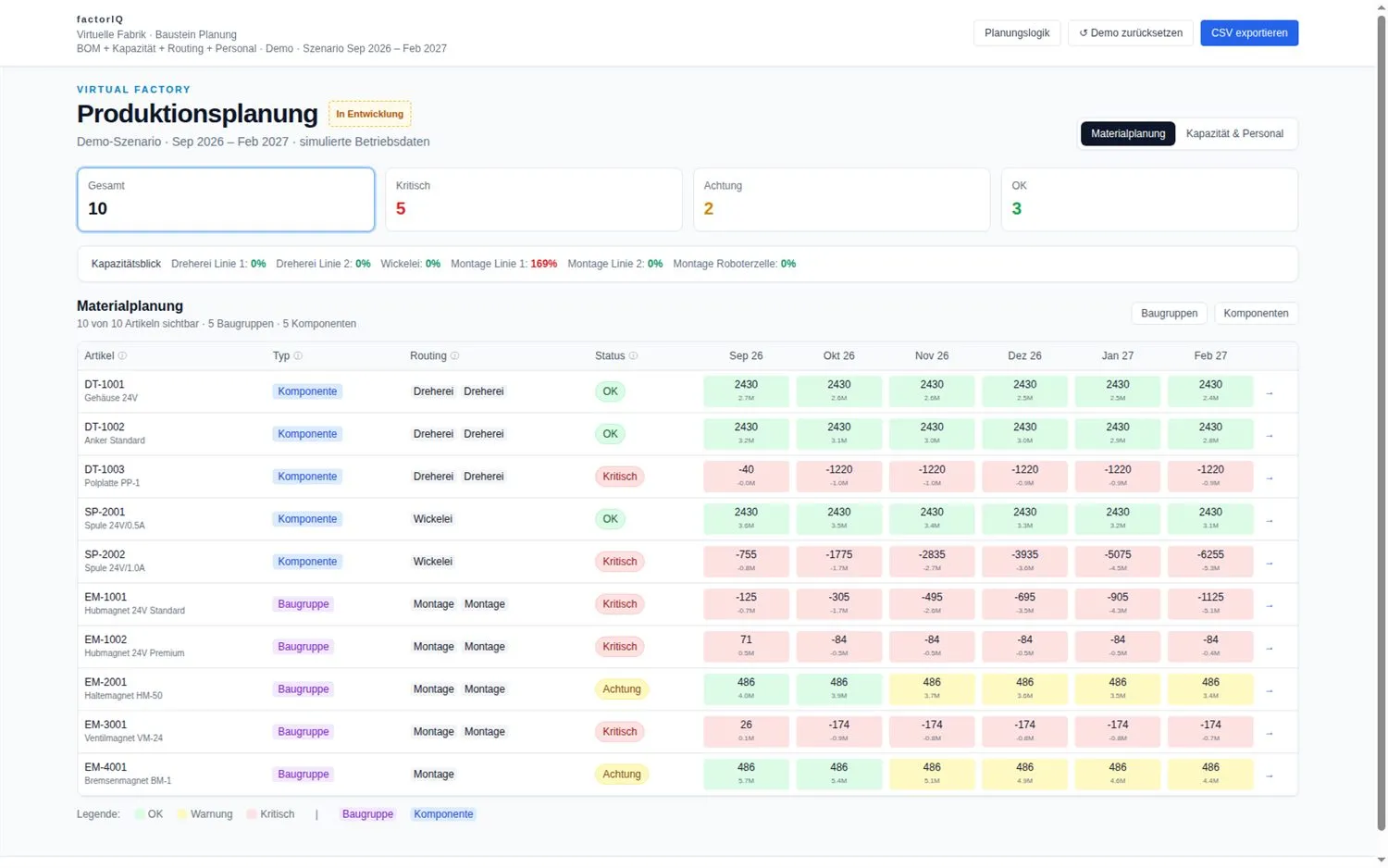
Stock, bills of materials, and capacity over six months. Changes remain a preview until the planner confirms them.

Evidence: demonstrable version with preview, confirmation, and reset

Lead time

in development

Tracks the bought-in parts from the bill of materials: promised dates, delays, stock. Reports bottlenecks before they show up in manufacturing.

Orchestrator

in development

The module receives, classifies, and forwards. Fixed rules and people decide.

Knowledge

in development

Manuals, work instructions, and file stores can be queried. Every answer names its source.

Root-cause analysis

planned

Explains deviations from measurements, machine data, and tool changes. A person chooses the action.

Service

planned

Queries after delivery: order, drawing, and inspection report pulled together, with a draft reply ready for approval.


Under the factory: ontology, data and existing systems

Lines show where a module takes its data from. Choose a module above to highlight its path.

Operations

Ontology

  • Customer
  • Order
  • Part
  • Operation
  • Department
  • Supplier

Data sources

  • Order PDF
  • Drawing
  • Instruction
  • Hand notes
  • ERP tables
  • Due date

Existing systems

  • Email
  • CAD/PDM
  • File share
  • MES
  • ERP
  • Excel

Learning loop

  1. Quality checksCustomer complaints
  2. Root-cause analysisOrder · part · operationplanned
  3. ApprovalYour team approves the change
  4. Revised
    Work instructionsrunning at customers
    Knowledgein development

Orange: modules whose approved improvements flow into the next order and quality check

the modules

How factorIQ works with your systems.

Orders, material, capacity, and quality share context with ERP and MES. Agents connect the work and learn from approved corrections.

Example: a supplier moves a delivery date

  1. ContextConnect orders, knowledge, and operating data.IllustrativeThe new delivery date reaches factorIQ.
  2. Agents and toolsCoordinate tools and checks.IllustrativeAgents find the affected orders; a solver checks feasible alternatives.
  3. Authorized actionComplete agreed work.IllustrativeYour team decides the trade-off. Agents prepare or carry out questions and tasks within agreed permissions.
  4. FeedbackLearn from outcomes.IllustrativeThe decision and its outcome improve the next context.
Verified outcomes improve the next context.
View the architecture →
and my data?

You decide where it runs.

DATA STAYS ON SITE

On your premises

Your data stays in your plant.

IOSYS · CH/EU

Operated by us

We run it in Switzerland or the EU.

YOUR MICROSOFT CLOUD

In your Azure

The application runs in your Microsoft environment.

The blue square shows the intended processing location.

Availability depends on the module. Use of the AI model provider is agreed separately.

frequently asked

What to know before a conversation.

What is factorIQ?

factorIQ is a product of iosys in Menzingen, Switzerland. AI agents connect orders, knowledge, and processes across your existing systems and independently move work forward. You set the goals and boundaries.

Does factorIQ replace our ERP or MES?

factorIQ works on your existing systems. ERP and MES stay customer systems that factorIQ reads and writes. Write permissions are approved separately for each workflow.

What runs today and what is in development?

Running today:
order entry, work instructions, and shop floor with customer-specific integration; inbox as the packaged entry point.
In development:
planning, lead time, orchestrator, and knowledge, plus drawing extraction as a separate capability, not part of production work instructions.
Planned:
root-cause analysis and service.

Who decides what the agents do?

Your team. Agents work within agreed permissions. Your team decides trade-offs, your people approve deviations, and uncertain values are flagged.

Where does my data run?

We settle that with you. The application can run on iosys servers in Switzerland or the EU, in your Microsoft environment, or, depending on the module, in your plant. Which deployment option is available depends on the module. Complete production operation with a local AI model is not proven, and the location of the application is not automatically where a model provider processes requests.

What results exist from projects?

At DUAP, ten screens show orders, due dates, and deviations, one per department, in around 30 hours of engineering effort. In the GEWO example shown, 32 of 36 fields were read with high confidence. maxon runs MIND from our maxon project in production in its own Azure environment today. maxon case study

What determines setup and running costs?

We do not publish a universal price for setting up or running factorIQ. These are scoped separately: interfaces and data access, workflow and checks, operating location, usage and support, and later changes. The order-processing case study is a single project, not a price list.

How do I get started?

Pick an available workflow with usable data and an accountable owner. Before a bounded pilot, we agree the baseline, review workload, and release criteria, then expand after observed performance. Write to us or book a call.

More answers before you start →
get started

Which workflow moves your factory forward?

  • In the first conversation, we discuss one workflow, the available data, and the accountable owner.
  • Together, we assess whether a bounded pilot would be useful.
Arrange a call →